03
Split-Horizon DNS Explained: How It Changes Network Behavior
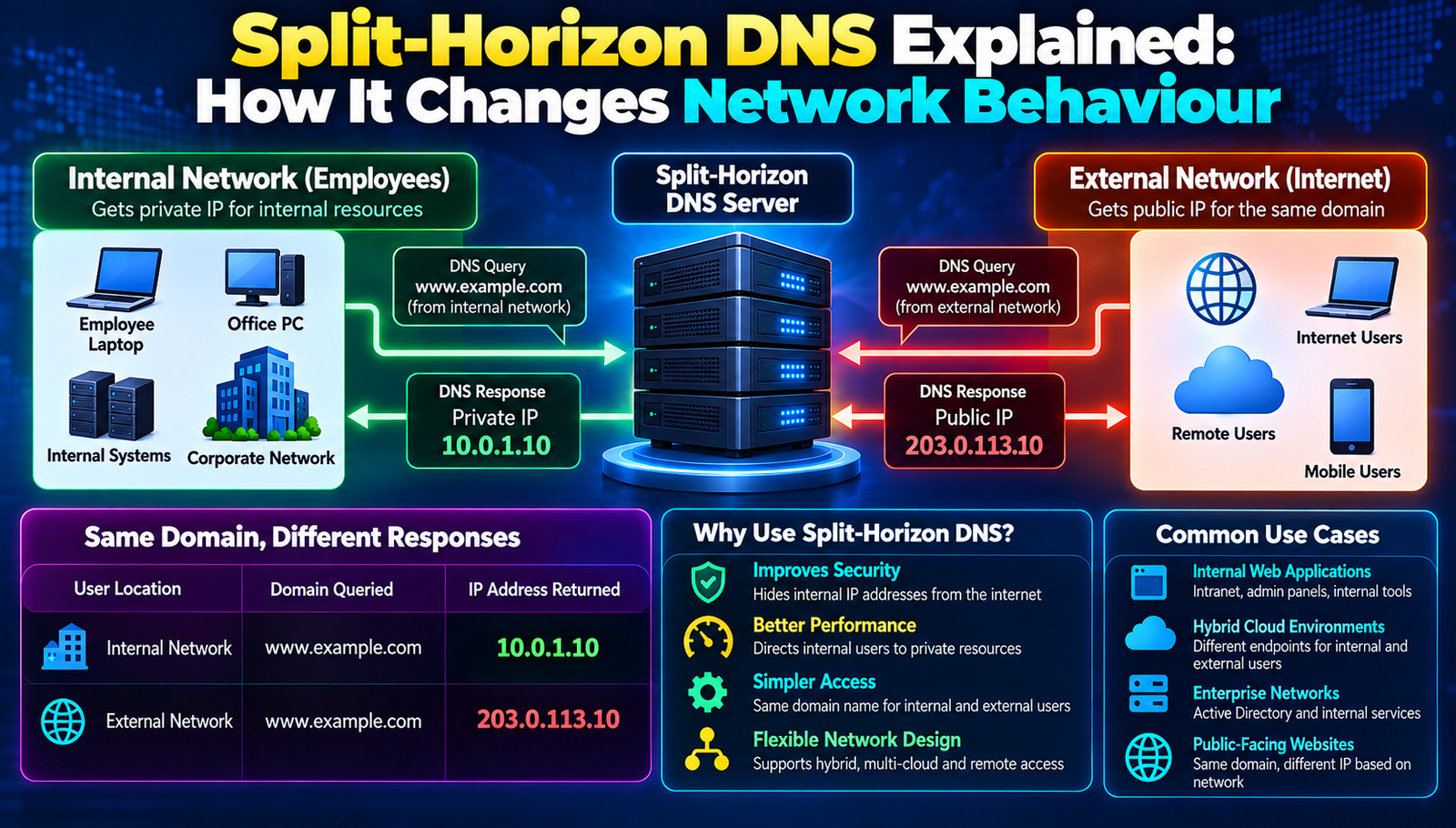
Split‑horizon DNS can dramatically alter how traffic flows across a network, boosting performance and security.
When Acme Corp migrated its internal web portal from a single public DNS record to a split‑horizon configuration, the average page load time dropped from 3.2 seconds to just 1.1 seconds for employees inside the headquarters, while external partners saw a consistent 2‑second response. The change also eliminated accidental exposure of internal services to the internet, saving the IT team countless hours of incident response. Choosing the right DNS strategy can be the difference between a smooth, secure network and a chaotic, vulnerable one. Understanding how split‑horizon DNS works, and how it stacks up against alternative approaches, is essential for any organization that relies on reliable name resolution.
A Closer Look at Split-Horizon DNS
Before diving into the side‑by‑side comparison, it helps to grasp the core concept behind split‑horizon DNS. Also known as view‑based or DNS‑based traffic segmentation, split‑horizon DNS serves different DNS answers based on the source of the query. An internal resolver might receive an internal IP address (e.g., 10.0.0.12) for intranet.example.com, while an external resolver gets a public address (e.g., 203.0.113.45). This separation allows organizations to expose only the resources that should be reachable from a given network segment.
Implementing split‑horizon DNS requires careful planning: administrators must define clear zones, maintain synchronized records, and ensure that the DNS infrastructure itself is resilient. Common pitfalls include stale internal records, mismatched TTL values, and insufficient monitoring of view‑specific queries. When done correctly, the technique can reduce latency, prevent accidental data leaks, and simplify multi‑site deployments.
- Resolution Latency
- Why It Matters: Impacts the user-perceived speed of applications.
- Typical Values: 10 ms – 200 ms
- Record Consistency
- Why It Matters: Prevents mismatched IP addresses between internal and external users.
- Typical Values: 99.9% synchronization
- Security Exposure
- Why It Matters: Limits the attack surface by hiding internal hosts.
- Typical Values: 0–2 exposed records
- Operational Overhead
- Why It Matters: Measures the effort required to maintain multiple DNS views.
- Typical Values: Low – High
Split-Horizon DNS Methods Worth Knowing
1. View‑Based Zones in BIND
BIND allows administrators to define "views" that map client IP ranges to specific zone files. Each view can contain its own set of A, CNAME, and other records, enabling precise control over what internal and external users see.
- Strengths:
- Widely adopted, extensive community support
- Fine‑grained control over IP ranges
- Robust ACL and logging features
- Challenges:
- Configuration syntax can become complex
- Performance impact on very large view sets
Best for: Organizations already using BIND and needing granular view definitions.
2. DNS Policies in Microsoft Windows Server
Windows Server 2016 introduced DNS policies that let administrators apply rules based on client subnet, time of day, or query type. Policies can direct queries to different forwarders or return distinct records, effectively creating a split‑horizon environment.
- Strengths:
- Native integration with Active Directory
- Graphical management via DNS Manager
- Policy‑based routing adds flexibility
- Challenges:
- Limited to Windows ecosystem
- Licensing costs for Windows Server Datacentre
Best for: Enterprises heavily invested in Microsoft technologies.
3. PowerDNS with Recursor and Authoritative Split
PowerDNS separates the recursive resolver from the authoritative server, allowing each to serve different views. The Recursor can be configured to forward internal queries to a private authoritative instance while external queries go to the public instance.
- Strengths:
- High performance, suitable for large query volumes
- SQL‑backed backend simplifies record management
- Open‑source core with commercial support options
- Challenges:
- Requires separate deployment of Recursor and authoritative components
- Steeper learning curve for SQL schema tuning
Best for: High‑traffic environments that need scalability and database‑driven record handling.
4. Cloud‑Based Split View with AWS Route 53
Route 53 offers "geolocation routing" and "latency‑based routing" that can simulate split‑horizon behaviour by returning different IPs based on the source region. Combined with private hosted zones, organizations can keep internal records separate from the public zone.
- Strengths:
- Fully managed service, no hardware maintenance
- Seamless integration with other AWS services
- Built‑in health checking and failover
- Challenges:
- Cost scales with query volume
- Vendor lock‑in to AWS ecosystem
Best for: Cloud‑first companies leveraging AWS for their infrastructure.
5. Kubernetes Core DNS with Conditional Forwarding
In containerized environments, Core DNS can be extended with the forward and hosts plugins to serve different records for pods inside the cluster versus external services. Conditional forwarding based on CIDR blocks creates a split view without a separate DNS server.
- Strengths:
- Native to Kubernetes, no extra DNS appliances needed
- Dynamic configuration via ConfigMap
- Lightweight and fast
- Challenges:
- Limited to Kubernetes‑centric workloads
- Complexity grows with multi‑cluster setups
Best for: Organizations running microservices on Kubernetes that require internal service discovery.
Method Comparison Overview
- BIND View-Based Zones
- Best For: Granular control in mixed-OS environments
- Difficulty: Medium
- Cost: Low (open source)
- Speed: Fast
- Windows DNS Policies
- Best For: Active Directory-centric enterprises
- Difficulty: Low-Medium
- Cost: Medium (license fees)
- Speed: Moderate
- PowerDNS Split
- Best For: High-volume, database-driven setups
- Difficulty: High
- Cost: Low-Medium (open source + optional support)
- Speed: Very Fast
- AWS Route 53
- Best For: Cloud-first, globally distributed services
- Difficulty: Low
- Cost: Medium-High (pay-per-query)
- Speed: Fast with edge locations
- Kubernetes Core DNS
- Best For: Container-native microservice architectures
- Difficulty: Low
- Cost: Low (open source)
- Speed: Fast within the cluster
How to Choose the Right One
First, identify the primary network topology. If the environment spans multiple data centres, a solution that supports geographic or latency‑based routing such as AWS Route 53 may align better with traffic patterns. For a single‑site or hybrid on‑premises deployment, BIND or Windows DNS policies often provide the needed granularity without adding cloud dependencies.
Next, assess operational expertise. Teams comfortable with Linux and SQL will find PowerDNS' database‑backed model intuitive, whereas groups that manage Windows Server daily will appreciate the graphical policy editor in Microsoft DNS. The learning curve directly influences rollout time and long‑term maintenance effort.
Third, calculate the total cost of ownership. Open‑source options like BIND, PowerDNS, and Core DNS have minimal license fees, but they may require additional hardware or engineering hours. Managed services such as Route 53 eliminate hardware concerns but introduce variable query‑based pricing that can grow with traffic spikes. A detailed cost model should include hardware, licensing, support contracts, and expected query volume.
Fourth, consider performance requirements. If sub‑millisecond resolution is critical for example, in high‑frequency trading platforms PowerDNS with a tuned MySQL backend or a dedicated BIND deployment with caching optimizations will outperform most managed services. For typical enterprise web applications, the latency differences among the options are usually negligible.
Finally, evaluate security and compliance constraints. Organizations subject to strict data residency rules may need to keep internal DNS records on‑premises, making BIND or Windows DNS the safer choice. Conversely, companies that already encrypt all traffic and rely on cloud IAM may find the built‑in health checks and DNSSEC support in Route 53 sufficient.
What This Means in Practice
Choosing split‑horizon DNS reduces the number of hops for internal users, because queries resolve to local IP addresses instead of being redirected through NAT gateways. The result is faster page loads and lower bandwidth consumption.
Internal services stay hidden from the public internet, which dramatically lowers the attack surface. Threat actors scanning public DNS records will never see the private IP space, preventing reconnaissance.
Application developers can rely on consistent hostnames across environments. The same domain name resolves to a development server inside the lab and to a production server for external customers, simplifying configuration files.
Network administrators gain a single point of control for traffic segmentation. Instead of maintaining multiple firewall rules, they can adjust DNS views to reroute users during maintenance windows.
Disaster recovery plans become more flexible. By swapping DNS views, traffic can be redirected to a backup data center without touching the underlying applications.
Overall operational overhead drops because DNS, rather than load balancers or proxies, handles the bulk of traffic steering. This frees up resources for higher‑level tasks such as capacity planning.
The Big Picture
Split‑horizon DNS offers a strategic lever to shape network behaviour, improve performance, and tighten security. Selecting the appropriate method hinges on topology, expertise, cost, performance, and compliance needs. By applying the decision framework outlined above, organizations can implement a DNS solution that aligns with their long‑term goals.
Contact
Missing something?
Feel free to request missing tools or give some feedback using our contact form.
Contact Us