02
What Is a Network Protocol? Types, Examples & How It Works
A friendly, step‑by‑step guide that demystifies network protocols, their types, and real‑world uses for absolute beginners.
Network protocols are quietly reshaping how devices talk to each other, making the internet feel instant and reliable. If you have just heard the term "network protocol" and wonder why it matters, you are not alone. This guide starts from square one, assuming no prior knowledge, and walks you through the concept, the why, and the how. By the end, even someone who has never opened a router will understand the role of protocols in everyday life.
The Basics of Network Protocol
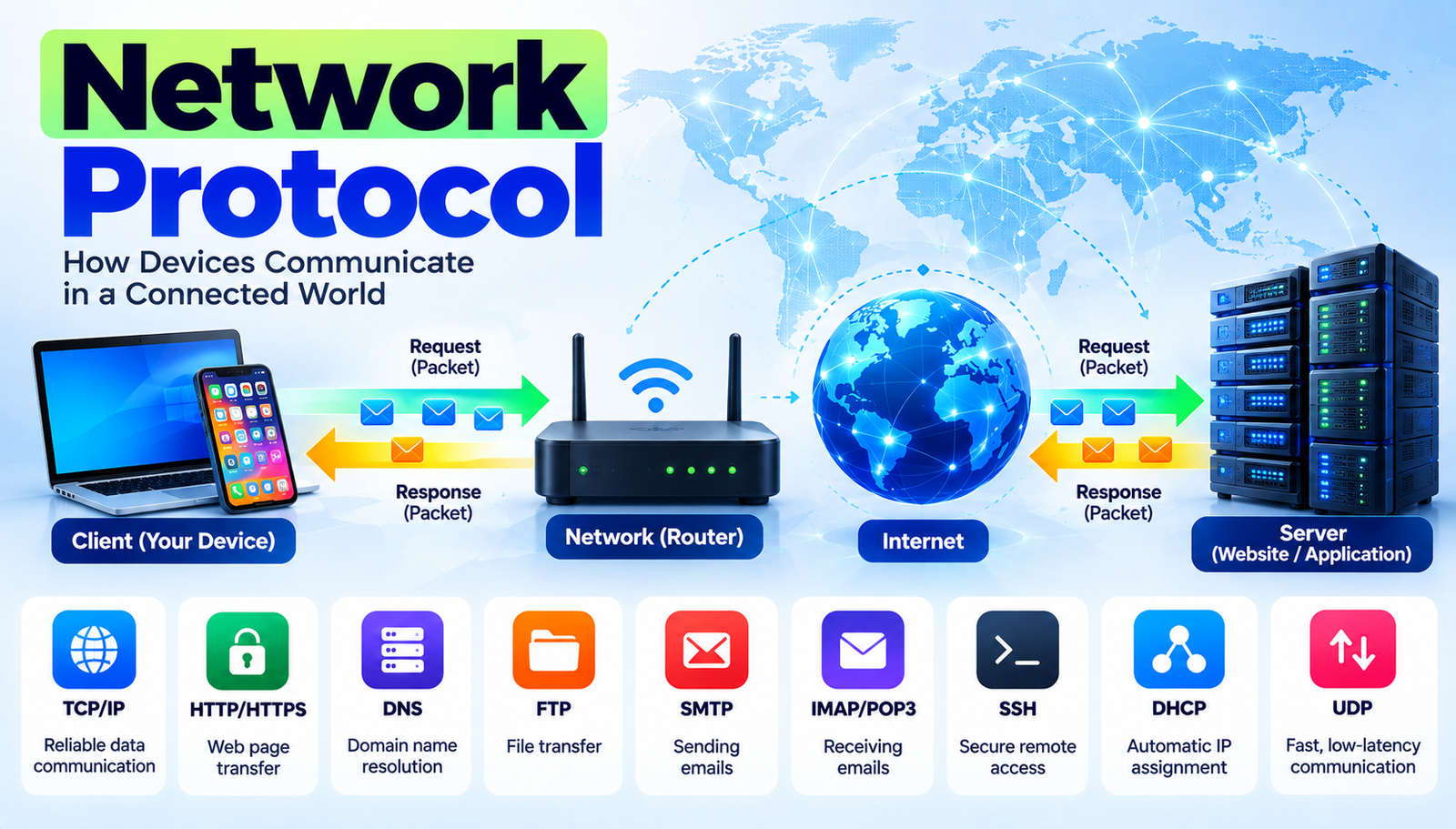
A network protocol is a set‑by‑step set of rules like a shared language that computers and other devices use to exchange data over a network (the collection of connected devices that can share information). Without these rules, devices would send garbled messages that no one could understand, much like two people speaking different languages without a translator.
- Protocol
- A predefined set of rules that tells devices how to format, send, receive, and interpret data.
- Packet
- A small bundle of data that travels across a network, similar to a sealed envelope.
- Port
- A virtual door on a device that directs incoming data to the right application, like a mailbox number.
- Handshake
- An initial exchange where two devices agree on how to communicate, similar to a greeting before a conversation.
- Layer
- A level in a stacked model, such as the OSI model, that groups related protocol functions together.
- Throughput
- The amount of data successfully delivered over a network in a given time, like the flow rate of water through a pipe.
Why What Is a Network Protocol?
Understanding network protocols matters because they are the invisible glue that holds modern communication together. Every email sent, video streamed, and online purchase made relies on a chain of protocols that ensure the data arrives intact and on time. For businesses, this translates into reliable customer experiences; for individuals, it means smooth video calls and quick page loads.
Who benefits the most? Small‑business owners who run e‑commerce sites see a direct impact studies show that a one‑second delay in page load can cut conversion rates by up to 7%. In the healthcare sector, protocols like HL7 enable electronic health records to be shared securely across hospitals, saving an estimated 30 minutes per patient encounter. Even gamers notice the difference: a well‑tuned UDP‑based protocol can reduce latency from 70 ms to under 30 ms, turning a choppy experience into a fluid one.
Real‑world impact is measurable. According to a 2023 industry report, the global market for network‑protocol‑enabled services exceeded $1.2 trillion, driven by cloud computing, IoT (Internet of Things), and 5G rollout. Each of these trends depends on protocols that can handle massive device counts and low‑latency demands. Without them, the promises of smart homes, autonomous vehicles, and remote surgery would remain fantasies.
Major Network Protocol Developments
1. TCP/IP Suite (Transmission Control Protocol/Internet Protocol)
What it is: The foundational set of protocols that powers the internet, handling how data is broken into packets and routed.
How to use it: When a device wants to load a webpage, TCP creates a reliable connection, confirming each packet arrives before moving on; IP then routes each packet across the world’s network of routers to the destination server.
Common beginner mistake: Assuming TCP guarantees speed reliability often adds slight delay, which is why streaming services sometimes switch to UDP.
Why It Works:
- Reliability through acknowledgment of each packet.
- Scalability because IP can address billions of devices.
2. UDP (User Datagram Protocol)
What it is: A lightweight protocol that sends packets without waiting for acknowledgment, ideal for time‑sensitive data.
How to use it: Online games and live video streams use UDP to push frames quickly; if a packet is lost, the next one arrives fast enough that the viewer rarely notices.
Common beginner mistake: Using UDP for file transfers where loss would corrupt data.
Why It Works:
- Minimal overhead, enabling low latency.
- Simple design that fits high‑frequency applications.
3. HTTP/HTTPS (Hypertext Transfer Protocol / Secure)
What it is: The protocol web browsers use to request and receive web pages; HTTPS adds encryption for security.
How to use it: When a user types a URL, the browser sends an HTTP GET request; the server replies with HTML, CSS, and JavaScript files that render the page. HTTPS wraps this exchange in TLS encryption, preventing eavesdropping.
Common beginner mistake: Ignoring the need for HTTPS, leaving data exposed to attackers.
Why It Works:
- Standardized request‑response model simplifies development.
- Encryption in HTTPS protects privacy and integrity.
4. DNS (Domain Name System)
What it is: A directory service that translates human‑readable domain names (like www.example.com) into IP addresses computers use.
How to use it: When a browser needs to connect to a website, it asks a DNS resolver to look up the domain; the resolver returns the IP address, allowing the browser to contact the server.
Common beginner mistake: Assuming DNS queries are always fast misconfigured DNS can add seconds of delay.
Why It Works:
- Hierarchical caching speeds up lookups.
- Distributed design avoids single points of failure.
5. SMTP, POP3, IMAP (Email Protocols)
What it is: A trio of protocols that handle sending (SMTP) and receiving (POP3/IMAP) email messages.
How to use it: When you click "send," your client contacts an SMTP server, which forwards the message; the recipient's client then retrieves the mail via POP3 (download‑only) or IMAP (server‑side sync).
Common beginner mistake: Using POP3 when multiple devices need synchronized mail, leading to missing messages.
Why It Works:
- Separate roles keep sending and receiving efficient.
- IMAP’s synchronization supports modern multi‑device usage.
6. TLS/SSL (Transport Layer Security / Secure Sockets Layer)
What it is: Cryptographic protocols that encrypt data in transit, preventing interception.
How to use it: Websites obtain a digital certificate; browsers verify it and then establish a TLS handshake, creating a secure channel for HTTP traffic (HTTPS).
Common beginner mistake: Using self‑signed certificates without proper verification, which defeats security.
Why It Works:
- Public‑key cryptography authenticates parties.
- Symmetric encryption ensures fast, secure data flow.
7. MQTT (Message Queuing Telemetry Transport)
What it is: A lightweight publish/subscribe protocol designed for IoT devices that have limited bandwidth and power.
How to use it: Sensors publish data to a broker; interested devices subscribe to topics and receive updates instantly, without each device needing a direct connection.
Common beginner mistake: Overloading the broker with high‑frequency messages, causing bottlenecks.
Why It Works:
- Minimal packet overhead suits constrained devices.
- Decoupled architecture scales easily with many clients.
Step 1: Understand TCP/IP Basics
- What You Do: Understand how packets travel.
- Expected Result: Reliable data delivery across the internet.
Step 2: Apply UDP
- What You Do: Use UDP for low-latency applications.
- Expected Result: Fast, real-time communication with occasional loss.
Step 3: Use HTTP/HTTPS
- What You Do: Request web resources.
- Expected Result: Secure, standardized web page delivery.
Step 4: Configure DNS
- What You Do: Configure DNS lookups for domain names.
- Expected Result: Human-readable addresses resolve to IPs.
Step 5: Set Up Email Protocols
- What You Do: Use SMTP and IMAP/POP3 for email.
- Expected Result: Reliable sending and synchronized receiving of messages.
Step 6: Enable TLS/SSL Encryption
- What You Do: Enable TLS/SSL encryption on services.
- Expected Result: Data is protected from eavesdropping.
Step 7: Implement MQTT
- What You Do: Use MQTT for IoT sensor networks.
- Expected Result: Efficient, low-power data distribution.
Frequently Asked Questions
1. What exactly is a network protocol?
A network protocol is a standardized set of rules that tells devices how to format, send, receive, and interpret data so they can communicate reliably.
2. Do I need to know all protocols to use the internet?
No. Most users interact only with higher‑level protocols like HTTP/HTTPS, while lower‑level protocols operate behind the scenes.
3. Why is TCP considered reliable but slower than UDP?
TCP confirms each packet arrives and retransmits lost ones, ensuring accuracy; this extra checking adds latency compared to UDP, which sends packets without confirmation.
4. Can I switch from HTTP to HTTPS on my own website?
Yes, by obtaining an SSL/TLS certificate and configuring the web server to use HTTPS, all traffic becomes encrypted.
5. What protocol should I use for a home automation system?
MQTT is ideal because it uses very little bandwidth and works well with devices that have limited processing power.
The Bottom Line
Network protocols are the unsung heroes that make every digital interaction possible, from a simple email to a complex IoT ecosystem. By grasping the core concepts and common types, beginners can troubleshoot issues, choose the right tools, and appreciate the technology that powers modern life. Armed with this knowledge, stepping into the world of networking becomes a confident and rewarding experience.
Contact
Missing something?
Feel free to request missing tools or give some feedback using our contact form.
Contact Us