04
MAC Address Flapping Explained: Causes, Effects & Fixes
MAC address flapping can silently wreck network traffic; this guide explains why and how to fix it.
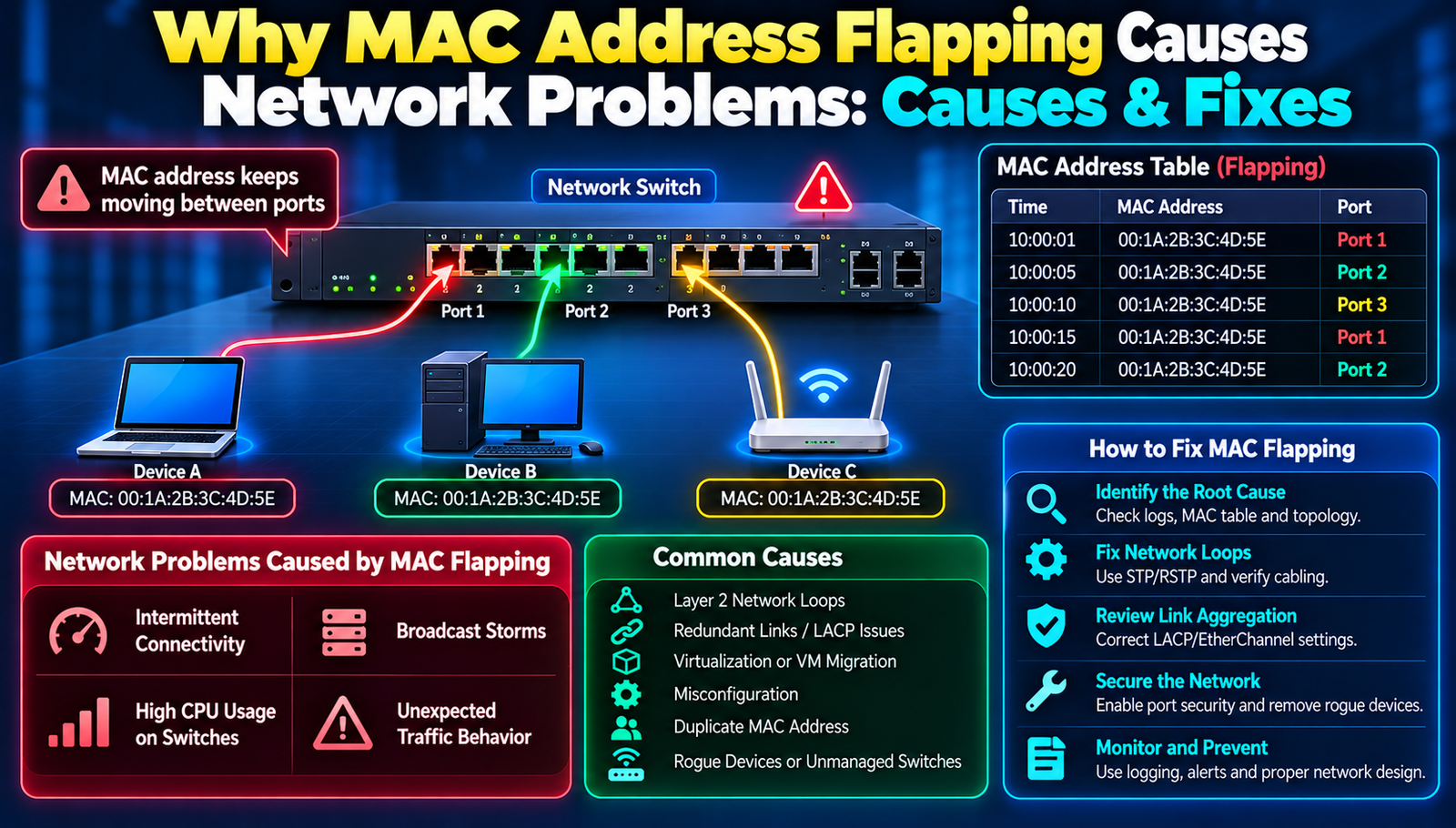
In the era of cloud‑centric workloads and hyper‑scale data centres, every packet counts. Network engineers are constantly battling subtle anomalies that can cascade into major outages. One such anomaly MAC address flapping has surged to the forefront of troubleshooting discussions because it can turn a well‑designed topology into a chaotic mess of duplicated frames, intermittent connectivity, and baffling performance drops. The frustration often begins with a simple symptom: a switch port that repeatedly goes up and down, or a host that intermittently loses access to critical services despite seemingly correct configurations. The underlying cause is rarely a broken cable; more often, it is a MAC address that appears on two different ports at the same time, confusing the forwarding tables and sending traffic on a wild goose chase. This invisible tug‑of‑war is what engineers call MAC address flapping, and it can silently erode network reliability.
Common Challenges With A Closer Look at Why MAC Address Flapping Causes Unexpected Traffic Behaviour
Inconsistent Port Status Alerts
Network monitoring tools flash warnings that a port is flapping, yet the physical link seems stable. The problem stems from the switch’s MAC address table constantly being updated with the same MAC on multiple ports, which the switch interprets as a topology change. Because the MAC table is a core component of forwarding decisions, the switch repeatedly relearns the address, generating rapid link‑state notifications that appear as port‑status churn.
Duplicate Frame Delivery
Hosts sometimes receive the same Ethernet frame twice, leading to application‑level errors and wasted bandwidth. This occurs when the switch forwards a frame to both ports that claim ownership of the flapping MAC address, effectively broadcasting the packet. The root cause is the switch’s inability to determine the correct egress port when the MAC address appears on two interfaces simultaneously.
Spurious Broadcast Storms
Broadcast traffic can explode in volume as the switch repeatedly floods the network while trying to locate the rightful destination for a flapping MAC. The underlying mechanism is the switch’s fallback to broadcast mode for unknown or ambiguous destinations, which, when combined with constant table churn, creates a feedback loop of excessive broadcasts.
Unexpected Latency Spikes
Applications that normally respond in milliseconds suddenly experience latency spikes of several seconds. The delay originates from the switch’s repeated learning process, which forces it to pause forwarding while updating its MAC table. During those micro‑seconds, packets queue up, and the cumulative effect appears as a noticeable latency increase.
Failure of Redundant Links
Redundant link protocols such as LACP or VRRP can fail to converge because the MAC address associated with the virtual router or aggregated link keeps moving between physical ports. The flapping MAC confuses the control plane, preventing the proper election of a primary link and leaving traffic stranded on a secondary path.
Major MAC Address Flapping Developments
1. Enable Port‑Security with Sticky MAC Learning
Configure the switch to lock a MAC address to a specific port after the first successful learning event. Implementation steps include:
- Enter interface configuration mode for the affected ports.
- Activate port‑security and set the maximum MAC count to one.
- Enable the sticky option so the switch records the learned MAC in the running configuration.
- Save the configuration to make the binding persistent across reboots.
Strengths:
- Prevents the same MAC from appearing on multiple ports.
- Provides an audit trail of legitimate MAC‑port bindings.
- Reduces the frequency of MAC table churn.
2. Deploy Loop‑Prevention Protocols (RSTP/MSTP)
Rapid Spanning Tree Protocol (RSTP) and Multiple Spanning Tree Protocol (MSTP) detect and block loops that often cause flapping. To implement:
- Enable RSTP globally on the switch.
- Assign VLANs to appropriate MST instances if using MSTP.
- Configure edge ports with port fast to avoid unnecessary topology changes.
- Verify that BPDU guard is active on access ports to shut down accidental bridge connections.
Strengths:
- Automatically disables physical loops that generate duplicate MAC appearances.
- Improves convergence time compared with classic STP.
- Works transparently with existing VLAN segmentation.
3. Use DHCP Snooping with Dynamic ARP Inspection
By binding IP‑to‑MAC mappings at the DHCP server level, the network can reject frames that claim an unauthorized MAC on a different port. Implementation steps are:
- Enable DHCP snooping on each VLAN and specify trusted ports (typically uplinks).
- Configure a DHCP snooping database to persist lease information.
- Activate Dynamic ARP Inspection (DAI) to validate ARP packets against the snooping database.
- Monitor the DAI log for violations that indicate flapping activity.
Strengths:
- Provides a second line of defense beyond MAC‑port binding.
- Detects rogue devices attempting to spoof MAC addresses.
- Integrates with existing DHCP infrastructure without additional hardware.
4. Implement MAC‑Based VLAN Assignment
Assign devices to VLANs based on their MAC address, ensuring that a given MAC never traverses multiple VLANs. Steps include:
- Create a MAC‑based VLAN policy on the switch.
- Map each known MAC to a specific VLAN ID in the policy table.
- Apply the policy to the relevant ports, typically edge ports.
- Test by moving a device to a different port and confirming it remains in the same VLAN.
Strengths:
- Segregates traffic at Layer 2, reducing the chance of cross‑port MAC duplication.
- Simplifies troubleshooting by limiting the scope of a flapping MAC to a single VLAN.
- Works well in environments with static device inventories.
5. Upgrade Firmware and Apply Vendor‑Specific Bug Fixes
Many MAC‑flapping incidents stem from firmware bugs that mishandle MAC learning under high load. To address this:
- Check the vendor’s release notes for MAC‑learning or STP bug fixes.
- Schedule a maintenance window to upgrade the switch OS.
- Validate the upgrade in a lab environment before production rollout.
- Monitor post‑upgrade MAC table stability for at least 24 hours.
Strengths:
- Removes root‑cause software defects.
- Often includes performance optimizations for MAC handling.
- Provides long‑term support and security patches.
6. Deploy a Dedicated MAC‑Learning Controller (SDN)
Software‑Defined Networking (SDN) can centralize MAC address management, offering global visibility and automated conflict resolution. Implementation involves:
- Install an SDN controller compatible with the existing switch hardware.
- Configure the switches to operate in OpenFlow or a vendor‑specific SDN mode.
- Define policies that reject MAC moves across ports without explicit approval.
- Use the controller’s dashboard to monitor MAC‑flap events in real time.
Strengths:
- Provides a single pane of glass for MAC‑address events across the entire fabric.
- Automates remediation, reducing manual intervention.
- Enables advanced analytics to predict future flapping scenarios.
- Port Security
- Old Way: Static MAC limits without learning.
- Better Way: Sticky MAC learns and locks MAC addresses automatically.
- Result: Fewer false positives and dynamic adaptation.
- Loop Prevention
- Old Way: Manual BPDU configuration.
- Better Way: RSTP/MSTP with BPDU Guard.
- Result: Rapid detection and automatic blocking.
- DHCP Snooping
- Old Way: No validation of ARP.
- Better Way: Dynamic ARP Inspection tied to DHCP leases.
- Result: Reduced spoofing and clearer MAC ownership.
- VLAN Assignment
- Old Way: Static VLANs assigned per port.
- Better Way: MAC-based VLAN mapping.
- Result: Consistent traffic segregation and fewer cross-VLAN flaps.
- Firmware Management
- Old Way: Ad-hoc updates.
- Better Way: Scheduled, tested, and vetted upgrades.
- Result: Improved stability, security, and performance.
Why People Are Paying Attention
At a multinational financial firm, a sudden surge in MAC‑flap alerts coincided with a critical end‑of‑day batch job failure. After deploying sticky port‑security, the flapping stopped, and the batch completed on schedule, saving the company millions in potential penalties.
A cloud service provider experienced intermittent latency spikes for a high‑traffic API. By enabling RSTP with BPDU guard on all edge switches, the hidden loop that caused duplicate MAC appearances was eliminated, restoring sub‑millisecond response times.
An enterprise data center struggled with broadcast storms that saturated uplink bandwidth. Implementing DHCP snooping and DAI gave the network visibility into rogue MAC movements, cutting broadcast traffic by 70% and freeing bandwidth for production workloads.
A university campus network faced frequent VLAN mismatches after students moved laptops between dorms. MAC‑based VLAN assignment ensured each device remained in its assigned VLAN regardless of port, reducing support tickets by half.
A telecom operator upgraded its switch firmware to a version that fixed a known MAC‑learning bug. The upgrade eliminated recurring flap events that had plagued the network for months, leading to a measurable increase in overall network uptime.
Step-by-Step Action Plan
- Audit the MAC address table on all core switches to identify flapping entries; this reveals which devices are causing instability.
- Enable sticky port‑security on the ports that host the offending MACs; locking the MAC prevents it from appearing elsewhere.
- Activate RSTP with BPDU guard on all access ports; rapid loop detection stops the root cause of many flaps.
- Configure DHCP snooping and Dynamic ARP Inspection on every VLAN; these services validate MAC‑IP bindings and block spoofed traffic.
- Map critical devices to VLANs based on their MAC addresses; MAC‑based VLAN assignment isolates traffic and avoids cross‑port duplication.
- Check vendor release notes and schedule a firmware upgrade that includes MAC‑learning fixes; up‑to‑date software removes known bugs.
- Monitor the network for at least 48 hours using the switch’s MAC‑flap counter; sustained stability confirms that the remediation was successful.
The Bottom Line
MAC address flapping is a subtle yet powerful disruptor of network performance, and most people miss this because the symptom appears as a generic port‑flap warning. By understanding why the MAC table churn occurs and applying a layered set of controls port‑security, loop prevention, DHCP validation, VLAN mapping, firmware hygiene, and SDN oversight engineers can transform an unpredictable network into a stable platform for business‑critical applications. The key thing to understand is that each solution addresses a distinct layer of the problem, and together they provide a comprehensive defense against unexpected traffic behaviour.
Contact
Missing something?
Feel free to request missing tools or give some feedback using our contact form.
Contact Us