04
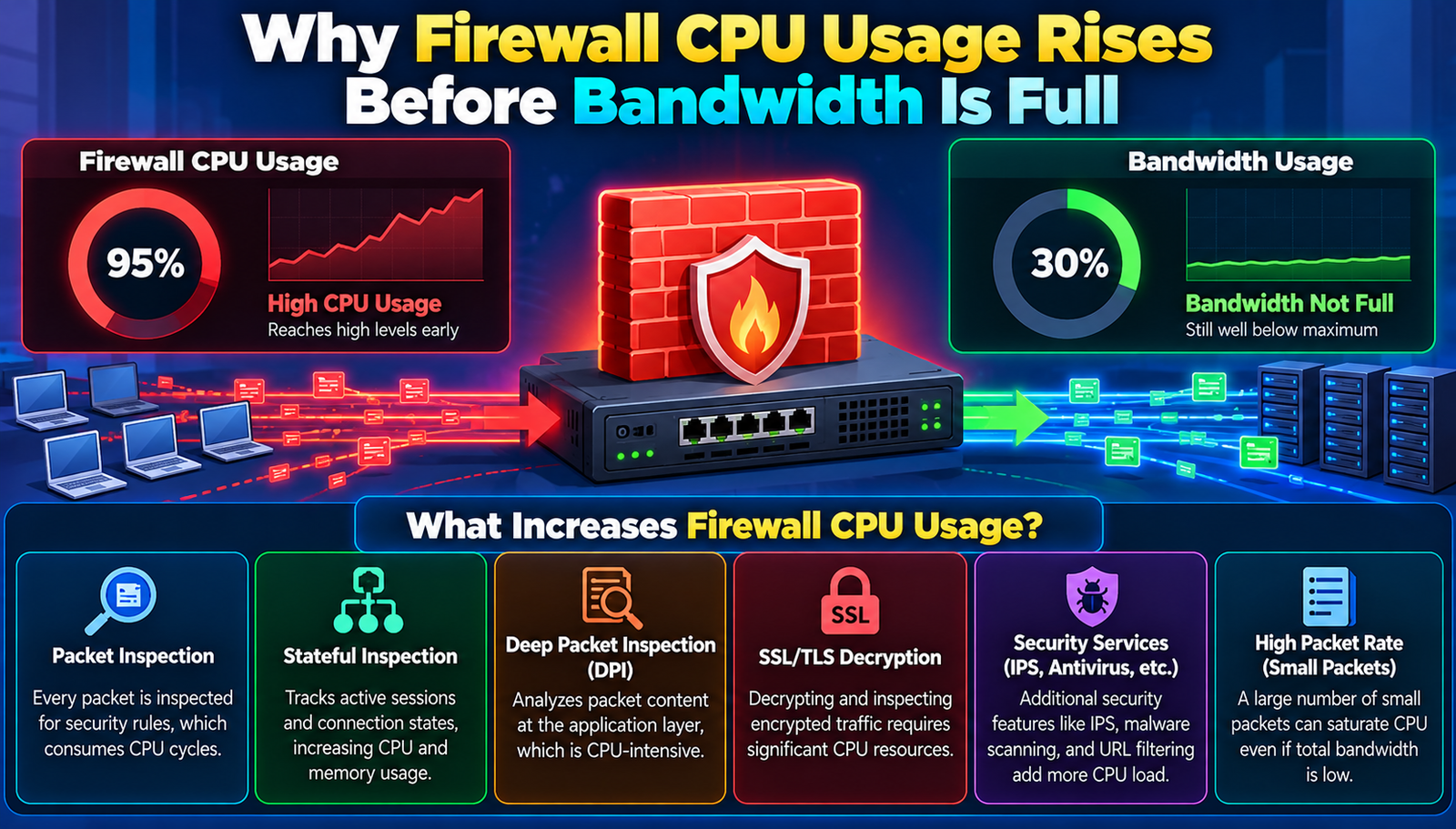
Why Firewall CPU Usage Rises Before Bandwidth Is Full
Firewall CPU usage can climb well before bandwidth fills up, revealing hidden processing demands that many overlook.
Everyone assumes that a firewall’s CPU usage only climbs when network traffic approaches the bandwidth ceiling. That notion is not only simplistic, it blinds administrators to the real culprits that drain processing power long before the pipe fills. Ignoring the early warning signs leads to over‑provisioned hardware, missed optimization opportunities, and costly downtime. Understanding why the CPU spikes first is essential for any organization that treats security as a strategic asset, not an after‑thought.
The Basics of Firewall Performance
Before dissecting the phenomenon, it is crucial to grasp what a firewall actually does with each packet. A modern firewall is a multi‑layered inspection engine that performs stateful tracking, deep packet inspection (DPI), application‑level filtering, intrusion prevention, SSL/TLS termination, and often integrates with logging, analytics, and sandboxing services. Each of these functions consumes CPU cycles, memory, and sometimes specialized hardware accelerators. The CPU becomes the bottleneck when the cumulative processing demand outpaces the available cycles, regardless of how much raw bandwidth remains unused.
Equally important is the distinction between raw throughput (bits per second) and processing throughput (packets per second). Bandwidth measures volume, while CPU usage measures complexity. A single high‑volume flow can saturate a link with minimal CPU impact, whereas thousands of low‑volume, high‑complexity flows can max out the processor while the link sits at a fraction of its capacity. This mismatch explains why administrators who focus solely on bandwidth miss the real performance constraints.
- Packets per Second (PPS)
- Why It Matters: Directly drives CPU cycles required for inspection
- Typical Range: 10K–2M
- Concurrent Sessions
- Why It Matters: State table size affects memory and CPU usage
- Typical Range: 5K–500K
- SSL/TLS Offload Ratio
- Why It Matters: Decryption is CPU-intensive
- Typical Range: 30–70%
- Inspection Depth
- Why It Matters: DPI versus ACL-only inspection changes CPU load
- Typical Range: Basic to Full
Firewall Methods Worth Knowing
1. Stateless Access Control List (ACL) Filtering
Stateless ACLs evaluate packets against a static rule set without tracking connection state. The logic is simple: match source, destination, ports, and protocol, then allow or deny.
Plus Points:
- Minimal CPU overhead
- Predictable performance across traffic spikes
- Easily audited and documented
Hurdles to Overcome:
- Cannot detect spoofed or fragmented attacks
- Lacks context for application‑level threats
Best for: Environments with low security complexity and high throughput demands.
2. Stateful Inspection
Stateful firewalls maintain a session table, correlating inbound and outbound packets to ensure they belong to an established connection. This adds a layer of security by dropping unsolicited packets.
Plus Points:
- Blocks many common scanning techniques
- Provides basic NAT support
- Improves visibility into legitimate sessions
Hurdles to Overcome:
- Session table consumes memory and CPU
- Performance degrades with many short‑lived flows
Best for: Mid‑size networks that need a balance of security and performance.
3. Deep Packet Inspection (DPI)
DPI parses packet payloads to identify applications, protocols, and malicious signatures. It enables granular policies such as allowing Facebook only during business hours.
Plus Points:
- Fine‑grained control over applications
- Detects protocol‑level exploits
- Integrates with threat intelligence feeds
Hurdles to Overcome:
- CPU‑intensive, especially on encrypted traffic
- Higher latency due to payload parsing
Best for: Organizations with strict compliance or data‑loss‑prevention requirements.
4. SSL/TLS Decryption and Inspection
Modern firewalls often terminate SSL/TLS sessions, decrypt traffic, inspect the plaintext, then re‑encrypt before forwarding. This exposes hidden threats hidden inside encrypted streams.
Plus Points:
- Reveals malware hidden in HTTPS
- Enables content filtering on encrypted sites
- Provides visibility for data‑exfiltration attempts
Hurdles to Overcome:
- Massive CPU load for cryptographic operations
- Potential privacy and compliance concerns
Best for: Enterprises that cannot afford blind spots in encrypted traffic.
5. Integrated Intrusion Prevention System (IPS)
An IPS adds signature‑based and anomaly‑based detection to the firewall, actively blocking exploits in real time. It often shares the same processing pipeline, intensifying CPU demand.
Plus Points:
- Blocks zero‑day exploits with heuristic analysis
- Provides detailed forensic logs
- Can automatically update signatures
Hurdles to Overcome:
- Signature updates can cause CPU spikes
- Complex rule sets increase processing time
Best for: High‑security environments where active threat mitigation is non‑negotiable.
- Stateless ACL
- Best For: High-throughput, low-security needs
- Difficulty: Easy
- Cost: Low
- Speed Impact: Negligible
- Stateful Inspection
- Best For: Balanced security and performance
- Difficulty: Moderate
- Cost: Medium
- Speed Impact: Low to moderate
- Deep Packet Inspection
- Best For: Granular application control
- Difficulty: Hard
- Cost: High
- Speed Impact: Significant
- SSL/TLS Decryption
- Best For: Visibility into encrypted traffic
- Difficulty: Hard
- Cost: High
- Speed Impact: Very high
- Integrated IPS
- Best For: Active threat mitigation
- Difficulty: Hard
- Cost: High
- Speed Impact: High
How to Choose the Right One
Identify the traffic profile first. If the network carries thousands of short‑lived web requests, packet‑per‑second rates will dominate CPU usage. If bulk file transfers dominate, bandwidth will be the limiting factor. Mapping the mix of protocols, encryption rates, and application types informs which inspection layers will actually be exercised.
Quantify the security risk tolerance. Organizations that must comply with PCI‑DSS, HIPAA, or GDPR cannot afford to skip SSL decryption or IPS, even if the CPU cost is steep. Conversely, a small retail shop with a single point‑of‑sale may prioritize throughput over deep inspection.
Measure the existing hardware headroom. Use SNMP or vendor‑specific telemetry to capture CPU utilization under baseline load, then simulate peak scenarios. If the CPU already sits at 60 % during normal operation, adding DPI or IPS will likely push it beyond safe limits before the link saturates.
Consider the scalability path. Some firewalls support hardware acceleration modules (ASICs, NPUs) for specific functions like SSL offload. Investing in a platform that can add these modules later avoids premature hardware replacement when traffic grows.
Balance cost against operational impact. High‑cost appliances with dedicated decryption engines may reduce CPU usage dramatically, but the total cost of ownership includes licensing, training, and maintenance. A cheaper appliance with a well‑tuned rule set can sometimes achieve comparable performance if the rule complexity is kept low.
The Impact on Consumers
When the firewall’s CPU spikes early, users experience increased latency even though the internet pipe is still largely idle. This hidden lag can erode productivity, especially for latency‑sensitive applications like VoIP or remote desktop.
Early CPU saturation also reduces the firewall’s ability to log and alert. Critical security events may be dropped or delayed, leaving the organization blind to emerging threats.
Over‑provisioned bandwidth without addressing CPU bottlenecks leads to wasted capital. Money spent on gigabit links is ineffective if the firewall cannot process packets at that rate.
Conversely, a well‑tuned firewall that manages CPU load preserves user experience, maintains compliance, and extends the life of existing network infrastructure.
Predictable performance allows IT teams to plan capacity upgrades based on real data rather than reacting to surprise outages caused by hidden CPU constraints.
Finally, a firewall that balances CPU and bandwidth efficiently contributes to overall network resilience, reducing the likelihood of cascading failures during traffic surges or attack events.
The Big Picture
CPU usage rising before bandwidth fills is a symptom of processing complexity, not a flaw in the link. Recognizing the distinction between packet‑rate pressure and raw throughput reshapes capacity planning. By aligning inspection depth, encryption handling, and hardware capabilities with actual traffic characteristics, organizations can avoid costly over‑engineering and keep both security and performance in lockstep.
Contact
Missing something?
Feel free to request missing tools or give some feedback using our contact form.
Contact Us