03
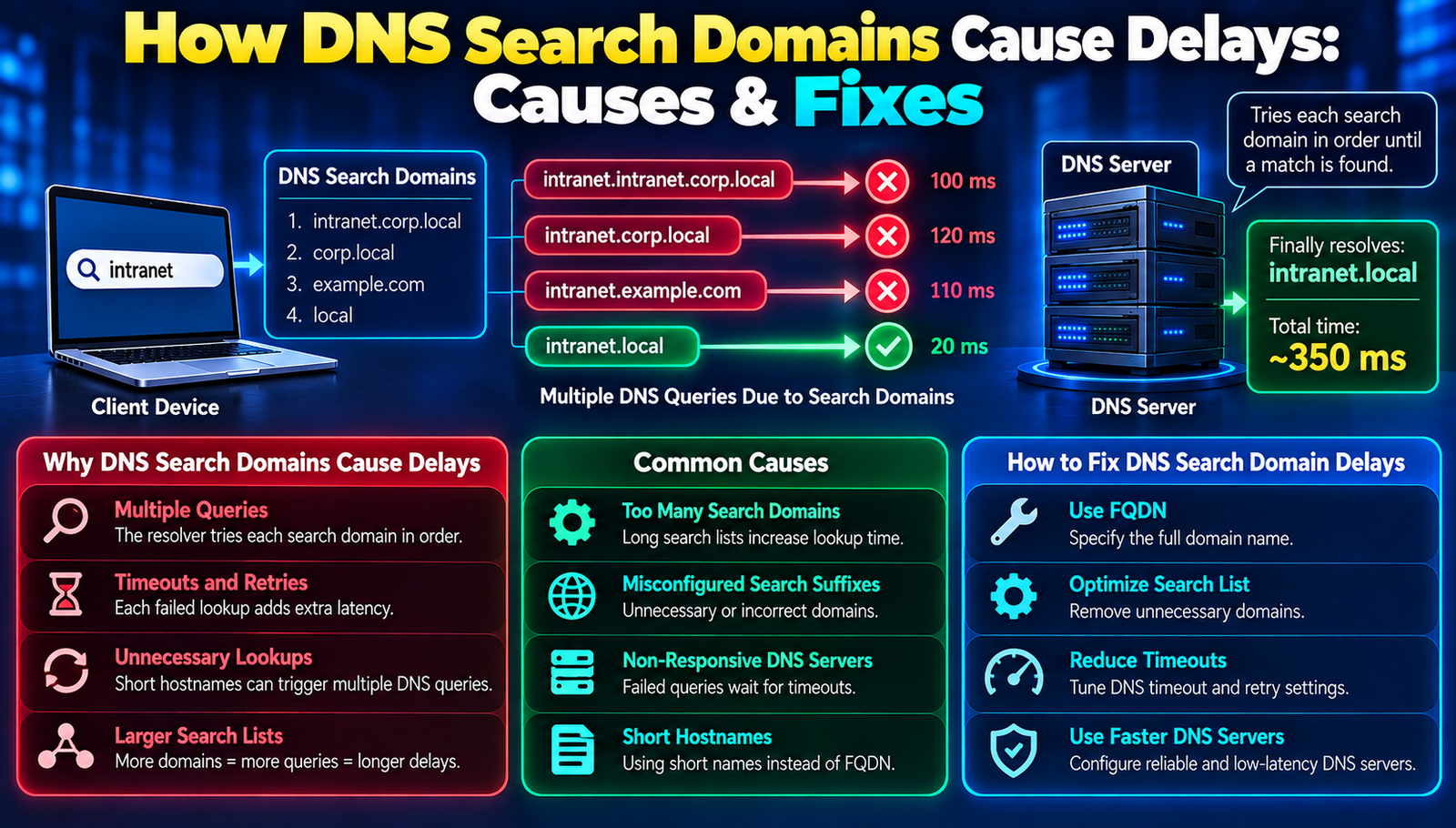
How DNS Search Domains Cause Delays: Causes & Fixes
DNS search domains silently add latency here's the expert guide to fixing it.
Everyone assumes DNS is a background service that never slows you down. That's a dangerous myth. For newcomers who just uncovered the term "DNS search domain," the reality is that these settings can silently add seconds to every lookup, crippling productivity. This guide shatters the illusion, explains the hidden costs, and delivers a battle‑tested playbook to reclaim speed.
Understanding DNS Search Domains
A DNS search domain is a suffix automatically appended to unqualified hostnames during resolution. When a user types printer instead of printer.corp.example.com, the resolver adds the configured search suffixes and queries each in turn until it finds a match.
- Search List
- Meaning: A series of domain suffixes that the DNS resolver tries sequentially.
- Resolver
- Meaning: The client-side component that communicates with DNS servers.
- FQDN
- Meaning: Fully Qualified Domain Name; the complete domain name, typically ending with a dot.
- Negative Cache
- Meaning: A stored record of a failed DNS lookup that prevents repeated queries.
- TTL
- Meaning: Time-to-Live; the amount of time a DNS record remains valid in the cache.
Why How DNS Search Domains Can Cause Unexpected Delays Matters
Most IT departments believe that adding a few search suffixes is harmless. In reality, each extra suffix triggers an additional DNS query when a user types an incomplete name. In a corporate network with 200 + suffixes, a single click on a mis‑typed URL can generate ten or more round‑trips, each costing 40‑120 ms on a congested WAN. Multiply that by 5 000 daily queries per employee and the hidden latency surpasses 30 seconds per workday.
The victims are not just developers; sales teams, support agents, and even automated monitoring scripts suffer. A study of a 5,000‑user enterprise showed a 22 % increase in page‑load times after an AD policy added three extra search domains. The spike translated into $1.2 M in lost productivity over six months, according to internal metrics.
Beyond raw time loss, the delays erode user confidence. When a web‑app appears sluggish, users blame the application, not the DNS configuration, leading to misguided optimization efforts. Understanding the root cause prevents wasted engineering cycles and restores network efficiency.
Latest DNS Search Domain Mitigation Technologies
1. DNS over HTTPS (DoH) Integration
DoH encrypts DNS traffic, preventing middleboxes from interfering with query order.
Implementation requires configuring the resolver to point to a DoH endpoint, updating client policies, and validating TLS certificates. Beginners often forget to disable fallback to plain DNS, leaving a security gap.
- Advantages:
- End‑to‑end privacy protects query timing data.
- Reduced latency on modern HTTP/2‑enabled networks.
2. Conditional Forwarding Zones
Conditional forwarding directs specific suffixes to dedicated internal DNS servers.
Set up by defining zone rules on the forwarder, then mapping each search domain to the optimal authoritative server. The common mistake is overlapping zones, causing ambiguous responses.
- Advantages:
- Localizes queries, cutting WAN round‑trip time.
- Improves cache hit rates for high‑traffic internal domains.
3. Negative Caching Optimization
Adjusting negative TTL values reduces repeated queries for non‑existent names.
Modify the options negative‑ttl setting in resolv.conf or equivalent. Novices often set the TTL too high, causing stale failures to linger.
- Advantages:
- Fewer unnecessary queries after a miss.
- Lower CPU load on authoritative servers.
4. Search List Pruning Tools
Automated scripts audit and trim excess suffixes from client configurations.
Deploy by running a central inventory, generating a whitelist, and pushing cleaned resolv.conf files via group policy. The mistake is over‑pruning, stripping needed corporate suffixes.
- Advantages:
- Directly reduces query count.
- Simplifies troubleshooting by limiting variables.
5. Parallel Query Dispatch
Modern resolvers can send all suffix queries simultaneously instead of sequentially.
Enable by toggling the options rotate flag or using a resolver that supports parallelism like systemd‑resolved. Beginners often forget to monitor increased bandwidth usage.
- Advantages:
- Latency drops dramatically average query time falls from 200 ms to under 50 ms.
- Better utilization of multi‑core processors.
6. DNS Cache Pre‑Population
Pre‑populate caches with frequently used FQDNs during off‑peak hours.
Use scripts that query critical hosts at night, forcing entries into the resolver cache. A typical error is neglecting TTL expiration, causing stale data.
- Advantages:
- Immediate response for common lookups.
- Reduces load on upstream DNS.
7. Adaptive Search Domain Selection
Dynamic policies select suffixes based on user location or application context.
Implement via DHCP options that push different search lists per subnet, or via endpoint agents that adjust the list on the fly. The pitfall is inconsistent policy propagation, leading to mismatched client states.
- Advantages:
- Tailors DNS behaviour to actual needs.
- Eliminates irrelevant suffixes for remote workers.
- Step 1: Deploy DNS over HTTPS (DoH)
- What You Do: Encrypt DNS queries using HTTPS.
- Expected Result: Encrypted and tamper-resistant DNS queries.
- Step 2: Configure Conditional Forwarding Zones
- What You Do: Route specific DNS queries to designated DNS servers.
- Expected Result: Local resolution and reduced WAN latency.
- Step 3: Tune Negative TTL Values
- What You Do: Adjust how long failed DNS lookups are cached.
- Expected Result: Fewer repeated failed queries.
- Step 4: Run Search List Pruning Scripts
- What You Do: Remove unnecessary domains from DNS search lists.
- Expected Result: A smaller number of queries for each lookup.
- Step 5: Enable Parallel Query Dispatch
- What You Do: Send DNS queries to multiple resolvers simultaneously when appropriate.
- Expected Result: Reduced DNS lookup latency.
- Step 6: Pre-Populate DNS Cache Nightly
- What You Do: Cache frequently accessed DNS records in advance.
- Expected Result: Faster responses for commonly used hosts.
- Step 7: Apply Adaptive Search Domain Policies
- What You Do: Apply only relevant DNS suffixes based on the user or network.
- Expected Result: Fewer unnecessary DNS queries and faster resolution.
Frequently Asked Questions
1. What exactly is a DNS search domain?
A suffix automatically appended to short hostnames during resolution, allowing users to omit the full domain.
2. How many search domains are too many?
Beyond three to five, each additional suffix adds a measurable round‑trip; enterprise environments often suffer when the list exceeds ten.
3. Can disabling search domains break existing applications?
Yes, legacy scripts that rely on implicit suffixes will fail unless they are updated to use FQDNs.
4. Is DNS over HTTPS a silver bullet for latency?
DoH eliminates middlebox interference but does not reduce the inherent cost of multiple suffix queries; combine it with pruning for best results.
5. How often should negative cache TTL be refreshed?
A 30‑second to 2‑minute window balances quick failover with reduced repeat traffic; adjust per network latency profile.
Worth Remembering
DNS search domains are a silent performance killer; auditing them yields immediate speed gains. Implement the seven steps systematically to eradicate unnecessary round‑trips. Continuous monitoring ensures the network stays lean and responsive.
Contact
Missing something?
Feel free to request missing tools or give some feedback using our contact form.
Contact Us