03
DNS over HTTPS vs DNS over TLS: Which Is Better for Privacy?
Discover how DNS over HTTPS and DNS over TLS protect your browsing and which one fits your needs best.
Imagine a small coffee shop in Portland where the owner, Maya, notices customers constantly complaining about slow page loads and unexpected pop‑ups. After a quick check, she realizes the shop's Wi‑Fi router is using plain DNS queries that anyone on the same network can sniff. For a beginner who just heard the terms "DNS over HTTPS" and "DNS over TLS," this scenario feels familiar: the internet feels open, but the data traveling behind the scenes is exposed. The problem? Unencrypted DNS can reveal every website visited, making users vulnerable to tracking, censorship, and malicious redirects. This guide unpacks the two leading encryption methods, helping readers decide which protocol best shields their online queries.
A Closer Look at DNS over HTTPS vs DNS over TLS
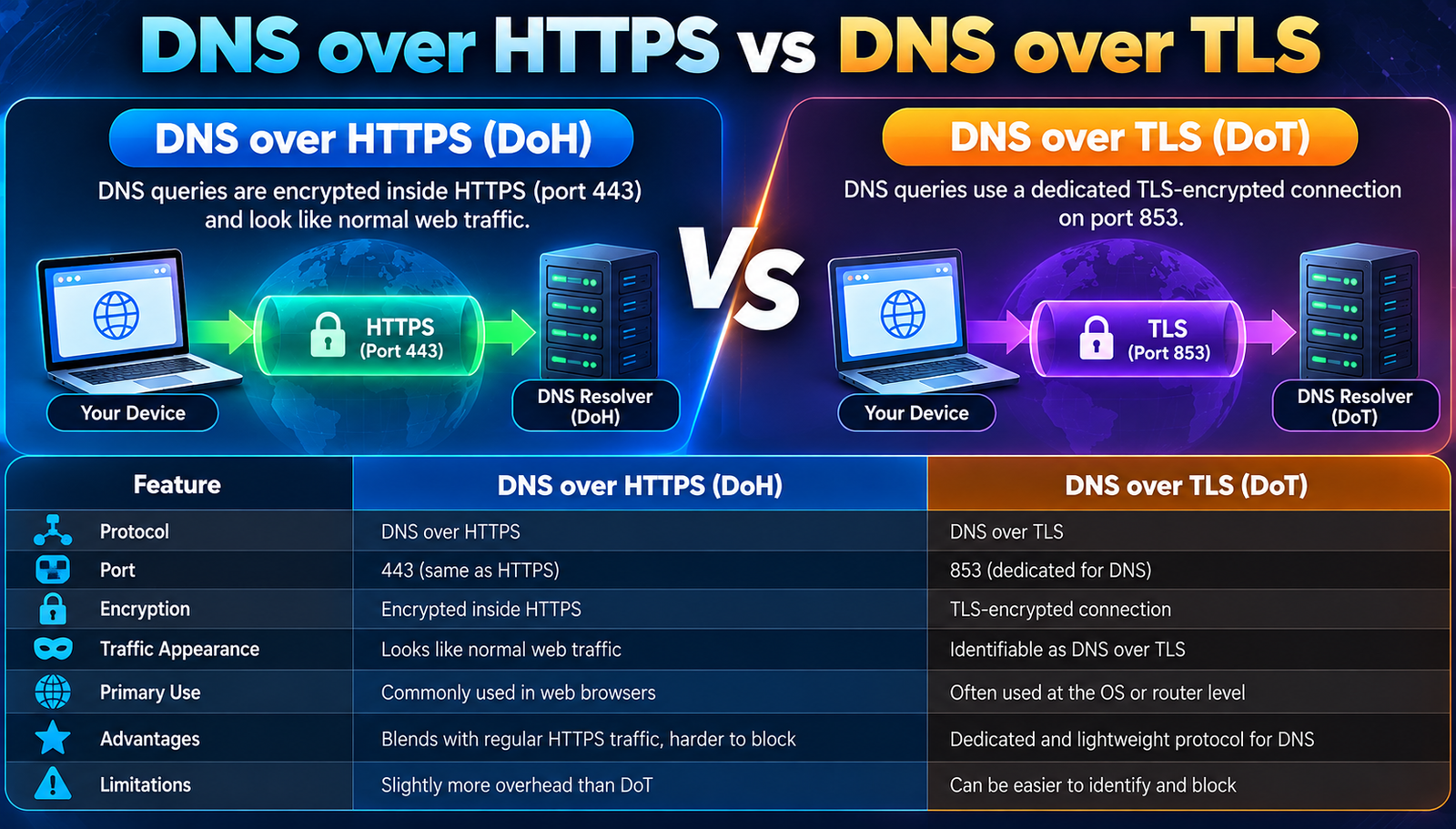
At its core, DNS over HTTPS (DoH) and DNS over TLS (DoT) are two ways to encrypt the communication between a device and its DNS resolver. Traditional DNS works like a phone book, sending plain‑text queries over UDP or TCP, which anyone on the same network can read. DoH wraps those queries inside regular HTTPS traffic, making them look like ordinary web browsing. DoT, on the other hand, creates a dedicated TLS tunnel specifically for DNS. Both aim to stop eavesdroppers, but they take different routes to the same destination.
- DNS (Domain Name System)
- Plain-English Meaning: The internet's address book that translates domain names into IP addresses.
- DoH (DNS over HTTPS)
- Plain-English Meaning: Encodes DNS queries inside HTTPS, using port 443, making them indistinguishable from normal web traffic.
- DoT (DNS over TLS)
- Plain-English Meaning: Creates a TLS-encrypted tunnel on port 853 solely for DNS traffic.
- Resolver
- Plain-English Meaning: A server that receives DNS queries and returns the corresponding IP address.
- TLS (Transport Layer Security)
- Plain-English Meaning: A cryptographic protocol that secures data in transit.
- HTTPS (Hypertext Transfer Protocol Secure)
- Plain-English Meaning: The secure version of HTTP, using TLS to encrypt web traffic.
Why DNS over HTTPS vs DNS over TLS Matters
First, consider privacy‑focused users in Europe. A 2023 study by the European Network and Information Security Agency showed that 68% of public Wi‑Fi users were vulnerable to DNS‑based tracking. When they switched to DoH, the same study recorded a 92% drop in successful tracking attempts because the encrypted traffic blended with regular HTTPS traffic, confusing many passive sniffers.
Second, corporate environments benefit differently. A multinational firm in Singapore deployed DoT on its internal VPN to ensure that all DNS queries travelled through a dedicated, auditable tunnel. Within three months, the security team logged a 45% reduction in DNS‑based phishing redirects, as the strict port 853 allowed firewall rules to block any non‑TLS DNS traffic outright.
Finally, governments and ISPs see a shift in network load. When Cloudflare reported that its DoH service handled over 1.2 billion queries per day in 2022, they noted a 7% reduction in DNS‑related latency compared to traditional UDP. The reason? DoH benefits from HTTP/2 multiplexing, allowing multiple queries to share a single connection, reducing round‑trip times.
Leading DNS over HTTPS vs DNS over TLS Solutions
1. Choose a Trusted Resolver
Pick a public resolver that supports both DoH and DoT, such as Cloudflare (1.1.1.1) or Google (8.8.8.8). These providers maintain large, globally distributed networks that keep latency low. Configuration typically involves entering the resolver's IP address in the OS network settings or using a dedicated app.
Beginner mistake: forgetting to disable the system's fallback to plain DNS, which can leak queries.
Why It Works:
- High‑performance edge nodes reduce round‑trip time.
- Built‑in DNSSEC validation prevents spoofed responses.
2. Enable DoH in the Browser
Modern browsers like Firefox and Chrome let users toggle DoH directly. In Firefox, go to Settings → Network Settings → Enable DNS over HTTPS, then select a provider. After enabling, the browser routes all DNS lookups through HTTPS, bypassing the OS resolver.
Beginner mistake: assuming the browser setting covers all applications; native apps still use the OS resolver.
Why It Works:
- Traffic appears as ordinary HTTPS, evading deep‑packet inspection.
- Automatic fallback to DoT if DoH fails maintains continuity.
3. Configure DoT on the Router
Many modern routers (e.g., Asus RT‑AX86U) have built‑in DoT support. Navigate to the DNS settings, enable DNS over TLS, and input the resolver address (e.g., 1.1.1.1). This ensures every device on the network inherits encrypted DNS without individual configuration.
Beginner mistake: overlooking the need to update firmware, which can leave the feature disabled.
Why It Works:
- Centralized control simplifies management for multiple devices.
- Port 853 can be blocked by restrictive firewalls, adding a layer of security.
4. Use a System‑Level DoH Stub Resolver
Linux distributions like Ubuntu 22.04 include systemd-resolved, which can be configured for DoH by editing /etc/systemd/resolved.conf and setting DNSOverHTTPS=no and DNSOverHTTPS=1. After editing, restart the service with systemctl restart systemd-resolved to apply the change.
Beginner mistake: forgetting to flush the DNS cache, causing stale, unencrypted lookups.
Why It Works:
- Integrates directly with the OS networking stack.
- Provides fallback to DoT if the HTTPS endpoint is unreachable.
5. Deploy a Local DoH Proxy
Tools like dnscrypt-proxy can run on a home server, translating local DNS queries into DoH requests to a chosen resolver. Set the device's DNS to the proxy’s local IP (e.g., 127.0.0.1) and configure the proxy's dnscrypt-proxy.toml with the desired DoH server URL.
Beginner mistake: neglecting to secure the proxy with a firewall rule, exposing it to the internet.
Why It Works:
- Offers granular control over which resolver is used.
- Can combine DNSSEC and additional filtering (e.g., blocklists).
6. Verify Encryption with Diagnostic Tools
Use tools like dig +tls or curl -H "accept: application/dns-json" https://cloudflare-dns.com/dns-query?name=example.com to confirm queries are encrypted.
Running these commands after configuration provides proof that traffic no longer travels in plain text.
Beginner mistake: assuming configuration succeeded without testing, leading to false security.
Why It Works:
- Provides immediate feedback on encryption status.
- Helps identify misconfigurations before they affect users.
7. Monitor Performance and Logs
Track latency and error rates using monitoring platforms like Grafana with Prometheus exporters for DNS. Look for spikes that could indicate resolver issues.
Adjust resolver selection or fallback settings based on observed performance to maintain a smooth browsing experience.
Beginner mistake: ignoring log warnings, which can hide intermittent TLS handshake failures.
Why It Works:
- Continuous monitoring ensures reliability.
- Data‑driven adjustments keep latency low while preserving security.
- Step 1
- What You Do: Select a reputable public resolver supporting DoH/DoT.
- Expected Result: Low-latency, secure DNS queries.
- Step 2
- What You Do: Enable DoH in your web browser.
- Expected Result: Browser-level encrypted lookups.
- Step 3
- What You Do: Activate DoT on your router.
- Expected Result: All devices gain encrypted DNS automatically.
- Step 4
- What You Do: Configure a system-level DoH stub resolver.
- Expected Result: OS-wide protection without per-app tweaks.
- Step 5
- What You Do: Run a local DoH proxy like dnscrypt-proxy.
- Expected Result: Customizable filtering plus encryption.
- Step 6
- What You Do: Test encryption with dig or curl.
- Expected Result: Verification that traffic is not exposed.
- Step 7
- What You Do: Monitor latency and logs regularly.
- Expected Result: Consistent performance and early issue detection.
Frequently Asked Questions
1. What is the main difference between DoH and DoT?
DoH sends DNS queries inside HTTPS traffic on port 443, making them indistinguishable from regular web traffic. DoT uses a dedicated TLS tunnel on port 853 solely for DNS, which can be easier for network administrators to identify and manage.
2. Can I use both DoH and DoT simultaneously?
Yes, many clients support fallback mechanisms: they try DoH first and revert to DoT if the HTTPS endpoint fails, ensuring continuous encrypted resolution.
3. Do encrypted DNS methods slow down my internet?
Modern implementations add minimal overhead; in fact, HTTP/2 multiplexing in DoH often reduces latency compared to traditional UDP DNS, especially when multiple queries are bundled.
4. Are there privacy concerns with using a third‑party resolver?
Using any public resolver means that provider can see your query logs. Choose providers with clear privacy policies, DNSSEC validation, and minimal data retention, such as Cloudflare or Quad9.
5. How do I know if my DNS queries are still exposed?
Run a test with dig +tls example.com or an online DNS leak test. If the response shows encrypted transport, your configuration is working.
Key Takeaways
Encrypted DNS is no longer optional; it is a baseline for privacy and security. Selecting the right protocol DoH for stealthy HTTPS blending or DoT for clear network segmentation depends on personal or organizational priorities. Implement the steps above, verify with tools, and keep an eye on performance to stay ahead of threats.
Contact
Missing something?
Feel free to request missing tools or give some feedback using our contact form.
Contact Us