03
Asymmetric Routing Explained: Causes, Network Problems & Fixes
Asymmetric routing can silently break networks learn what it is, why it matters, and how to fix it.
Network engineers and small‑business IT staff are hearing the term asymmetric routing more often than ever. The rise of multi‑cloud deployments, software‑defined networking, and edge computing has forced traffic to travel different paths in each direction, creating hidden problems that only show up under load or during troubleshooting. If you have just stumbled upon this concept, you might wonder why a seemingly harmless routing choice could cause packet loss, latency spikes, or security blind spots. The answer lies in how routers make decisions and how those decisions interact with firewalls, load balancers, and monitoring tools. This article unpacks the phenomenon in plain language, step by step, so even a complete beginner can grasp the risk and learn how to mitigate it.
What Does Asymmetric Routing Mean?
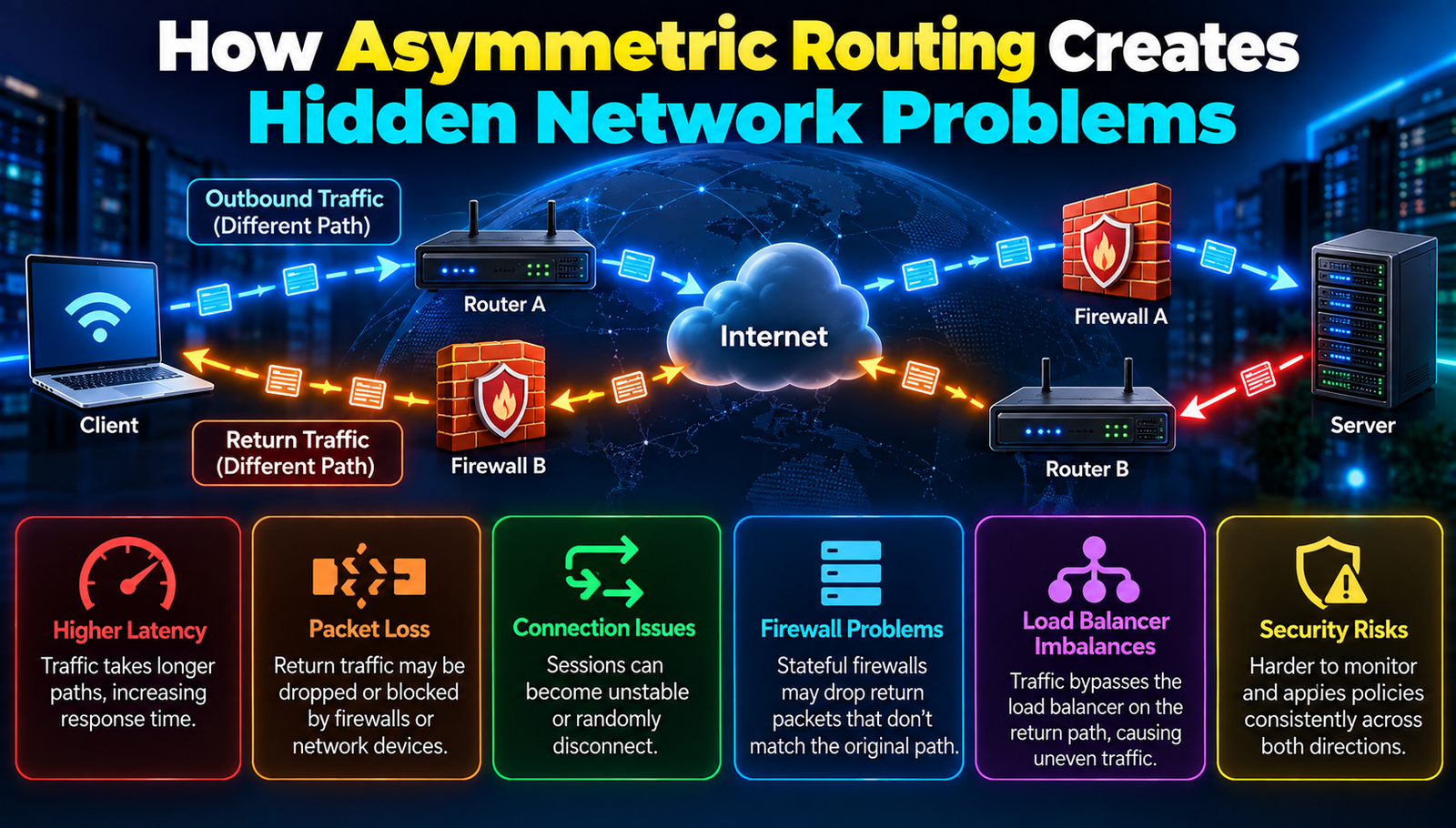
Asymmetric routing when the path that data packets take from point A to point B is different from the return path from B back to A means that the forward and reverse journeys travel through separate network devices or links. In other words, the outbound route and the inbound route do not mirror each other.
- Packet
- Plain-English Meaning: A small bundle of data that travels across a network.
- Router
- Plain-English Meaning: A device that decides where packets should go next.
- Load Balancer
- Plain-English Meaning: A system that distributes traffic across multiple servers to prevent any single server from becoming overloaded.
- Firewall
- Plain-English Meaning: A security barrier that inspects network traffic and blocks packets that don't meet security policies.
- Stateful Inspection
- Plain-English Meaning: A firewall technique that remembers connection details so it can match return traffic to the original request.
Why How Asymmetric Routing Creates Hidden Network Problems Matters
Enterprises that operate across multiple data centers, cloud regions, or remote offices often see cost savings and redundancy when they allow traffic to flow over the most efficient link in each direction. However, this convenience can backfire. When a packet leaves a corporate office on a high‑speed MPLS line but returns on a cheaper internet connection, the two paths may encounter different security devices, monitoring points, or quality‑of‑service (QoS) settings. The result is a mismatch that can cause packet drops, inaccurate metrics, or even exposure to attacks.
Consider a financial services firm that routes outbound API calls to a market data provider via a dedicated fiber line (low latency) but receives the responses over a shared broadband link (higher latency). The firm’s intrusion‑detection system (IDS) sits only on the fiber path. Because the return traffic never passes through the IDS, malicious payloads can slip by unnoticed, creating a security blind spot. In a 2023 industry survey, 42% of respondents reported at least one security incident that was traced to asymmetric routing.
From an operational standpoint, network engineers spend an average of 12 hours per month troubleshooting asymmetric‑routing‑related issues, according to a recent study by the Network Operations Consortium. That time adds up to over 140 hours per year per team, translating into lost productivity and higher support costs. Understanding the hidden impact is the first step toward designing a resilient architecture.
Major Asymmetric Routing Developments
1. Path Selection Algorithms
What it is: Modern routing protocols (e.g., BGP, OSPF) use path‑selection algorithms that weigh metrics such as link cost, bandwidth, and policy preferences.
How to use it: Configure the routing protocol to prefer symmetric paths for critical traffic by adjusting metric values or applying route‑maps that force traffic through the same devices in both directions. For example, set a lower OSPF cost on the primary link for both inbound and outbound routes.
Common beginner mistake: Changing only the outbound metric while leaving the inbound metric untouched, which simply creates a new asymmetry.
- Advantages:
- Improves predictability of traffic flow.
- Reduces chances of state‑mismatch in firewalls.
2. Stateful Firewalls and Connection Tracking
What it is: A stateful firewall remembers the details of each connection so it can verify that return packets belong to an existing session.
How to use it: Enable connection tracking on all firewalls that sit in the path of either direction. If a firewall cannot see both sides of a flow, configure a symmetric route or use a session‑mirroring feature that copies state information to the opposite firewall.
Common beginner mistake: Assuming a stateless ACL (access‑control list) will provide the same protection as a stateful inspection.
- Advantages:
- Detects unauthorized return traffic.
- Provides detailed logs for forensic analysis.
3. Network Address Translation (NAT) Consistency
What it is: NAT rewrites source or destination IP addresses so that private addresses can communicate over public networks.
How to use it: Apply NAT rules symmetrically on both ingress and egress devices. Use a central NAT pool to ensure that the same public address is used for both directions of a session.
Common beginner mistake: Deploying separate NAT pools on each edge router, causing return packets to be addressed to an unknown IP.
- Advantages:
- Maintains session continuity.
- Prevents “IP address not found” errors.
4. Monitoring and Telemetry Alignment
What it is: Monitoring tools collect flow data, latency measurements, and error counters to give visibility into network health.
How to use it: Deploy telemetry agents on both forward‑path and reverse‑path devices. Correlate the data using a common session identifier so that you can see the full round‑trip picture.
Common beginner mistake: Relying on a single‑direction NetFlow export, which hides loss that occurs on the opposite path.
- Advantages:
- Full‑stack visibility.
- Faster root‑cause analysis.
5. Multi‑Cloud Connectivity Strategies
What it is: Multi‑cloud strategies connect on‑premises infrastructure with several public clouds using VPNs, direct links, or SD‑WAN overlays.
How to use it: Design the overlay to enforce symmetric routing across the cloud edges. Many SD‑WAN solutions offer a “force‑symmetry” option that automatically creates matching inbound and outbound policies.
Common beginner mistake: Mixing VPN tunnels that have different encryption settings, causing asymmetric routing at the tunnel termination points.
- Advantages:
- Consistent security posture across clouds.
- Simplifies compliance reporting.
6. Quality‑of‑Service (QoS) Policies
What it is: QoS prioritizes certain traffic types (e.g., voice, video) by marking packets and allocating bandwidth.
How to use it: Apply identical QoS classifications on both forward and reverse paths. Use the same DSCP (Differentiated Services Code Point) values so that routers treat the traffic consistently.
Common beginner mistake: Setting high priority only on the outbound direction, causing the return packets to be delayed or dropped.
- Advantages:
- Ensures latency‑sensitive traffic remains stable.
- Prevents jitter caused by mismatched queues.
7. Route Redundancy and Failover Design
What it is: Redundant routes provide backup paths when a primary link fails.
How to use it: Configure failover mechanisms that switch both inbound and outbound routes together. Technologies like VRRP (Virtual Router Redundancy Protocol) can be set to move the virtual IP address symmetrically.
Common beginner mistake: Enabling failover only on one direction, which leaves the other direction stuck on a failed link.
- Advantages:
- Minimizes downtime during link failures.
- Maintains session state across failover events.
Step‑by‑Step Overview
- Step 1: Audit Current Routing Tables
- What You Do: Check routing tables for asymmetric paths.
- Expected Result: Identify mismatched inbound and outbound routes.
- Step 2: Adjust Protocol Metrics
- What You Do: Configure routing metrics to favor symmetric routes.
- Expected Result: Forward and reverse traffic use the same network devices.
- Step 3: Enable Stateful Inspection
- What You Do: Enable stateful inspection on all firewalls.
- Expected Result: Return packets are validated against the original sessions.
- Step 4: Standardize NAT Pools
- What You Do: Use consistent NAT pools across network edges.
- Expected Result: Consistent public IP mapping in both directions.
- Step 5: Deploy Path Telemetry
- What You Do: Monitor both sides of the network path.
- Expected Result: Full visibility into round-trip performance.
- Step 6: Apply Matching QoS Policies
- What You Do: Configure consistent QoS policies across the network.
- Expected Result: Latency-sensitive traffic remains stable.
- Step 7: Configure Symmetric Failover
- What You Do: Set up failover mechanisms that preserve path symmetry.
- Expected Result: Prevent single-direction outages when a link fails.
Frequently Asked Questions
1. What is the difference between symmetric and asymmetric routing?
Symmetric routing means the same set of devices handles traffic in both directions; asymmetric routing means the forward and return paths travel through different devices or links.
2. Can asymmetric routing cause security breaches?
Yes, because firewalls or IDS that only see one direction cannot match return traffic to an existing session, allowing malicious packets to bypass inspection.
3. Do all routing protocols support symmetric path enforcement?
Most modern protocols (BGP, OSPF, EIGRP) allow metric tuning and policy routing that can be used to enforce symmetry, though the exact configuration steps differ.
4. How does NAT affect asymmetric routing?
If NAT is applied inconsistently, the return path may try to reach an address that no longer exists, causing connection failures.
5. Is asymmetric routing always bad?
No; it can improve performance and cost efficiency when designed intentionally, but hidden asymmetry without proper controls creates hidden problems.
To Sum Up
Understanding how asymmetric routing creates hidden network problems equips organizations to design more reliable, secure, and observable infrastructures. By following the seven steps outlined, teams can eliminate surprise outages and protect critical data flows. The effort invested today prevents costly troubleshooting sessions tomorrow.
Contact
Missing something?
Feel free to request missing tools or give some feedback using our contact form.
Contact Us